Mukesh1@gmail.com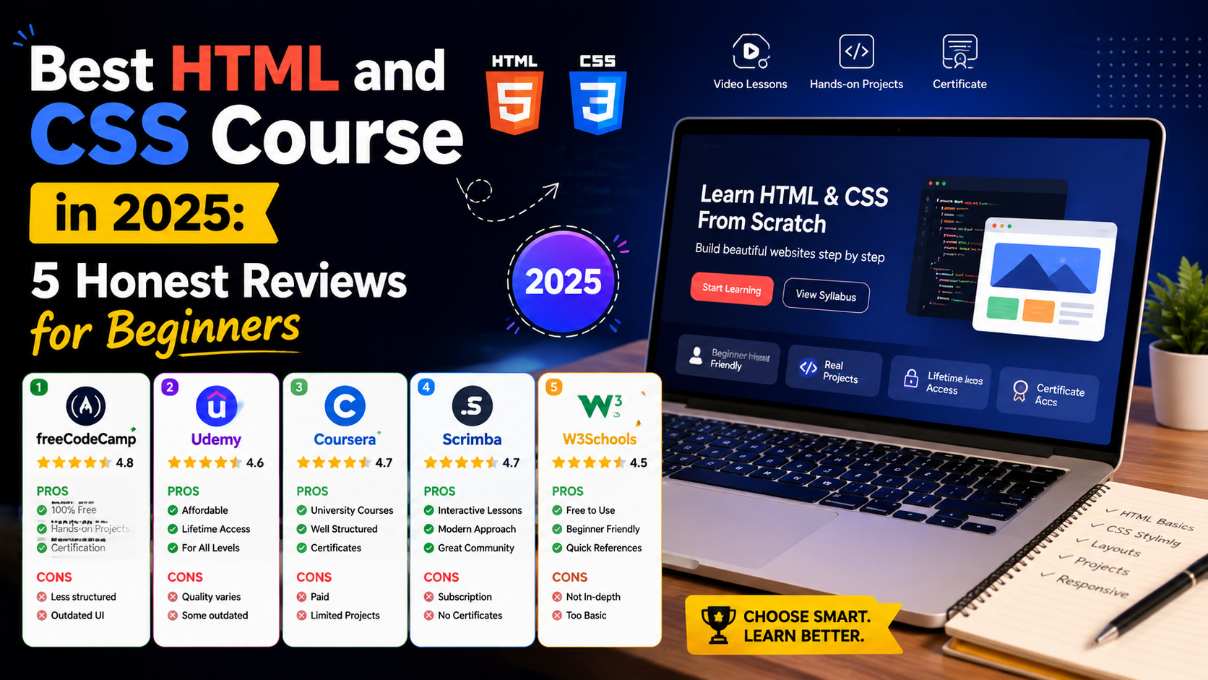
Finding a good HTML and CSS course in 2025 is harder than it sounds. There are hundreds of options out there — free, paid, video-based, project-driven, self-paced, bootcamp-style. Every single one claims to be perfect for beginners. That’s not always a lie, but it’s rarely the full truth either.
This guide doesn’t rank courses based on affiliate deals or star ratings. It’s a straight, experience-based look at the most widely used options available right now — what each one actually teaches, who it genuinely works for, and where each one falls short.
Why Picking the Right HTML and CSS Course Actually Matters
HTML and CSS are beginner-friendly subjects. The syntax isn’t intimidating. The feedback loop is immediate — you write something, open a browser, and see the result. Most core concepts can be grasped in weeks.
But a bad course can still slow you down quite a bit.
Some courses teach outdated practices that professional developers abandoned years ago. Some rush through CSS layout so fast that beginners hit a wall the moment they try building something real. Others are so light on projects that you finish 40 hours of video and still can’t build a simple webpage without step-by-step guidance.
The right HTML and CSS course matches the teaching style, depth, and pacing to how you actually learn — not just whatever shows up first in a search result.
What to Look For Before You Enroll
Before jumping into specific recommendations, here are the things worth checking in any HTML and CSS course before you commit time or money to it.
Does it teach semantic HTML? Courses that rely entirely on <div> and <span> for everything are already behind. Modern HTML development means understanding elements like <main>, <article>, <section>, and <nav> — and more importantly, knowing why they exist.
How is CSS layout covered? Flexbox and CSS Grid are the two layout systems that matter in modern web development. If a course spends most of its layout time on floats, it’s outdated. Both should be covered with hands-on practice, not just slides.
Are there real projects? Video tutorials without actual builds produce passive learners. The best courses make you construct real pages and components, not just reproduce what an instructor types line by line.
Is accessibility mentioned? It doesn’t need to be a deep dive at the beginner level. But any solid HTML and CSS course should at least introduce why proper HTML structure matters for screen readers and users with disabilities.
1. The Odin Project — Best Free Option With Real Project Depth
The Odin Project is a free, open-source web development curriculum with a strong reputation among self-taught developers. Its HTML and CSS foundations section is thorough, honest about difficulty, and genuinely project-driven.
What separates it from most free resources is its philosophy. You’re expected to read documentation, search for answers, and work through problems rather than just follow a video. That feels uncomfortable for some beginners. But it builds the kind of problem-solving instinct that actually matters once you’re working on real projects outside a tutorial environment.
The curriculum covers semantic HTML, Flexbox, CSS Grid, forms, and responsive design. Projects here are built from scratch — real decisions, real structure — not fill-in-the-blank exercises.
The active Discord community is also worth mentioning. When you get stuck, there are people available who’ve been through the same material and can help without just handing you the answer.
Best for: Self-motivated learners who want depth and are comfortable doing their own research. This is one of the most complete free HTML and CSS course paths available.
Where it falls short: The pacing feels slow early on because it’s thorough. Some beginners lose momentum before reaching the more engaging project sections.
Cost: Completely free, no premium tier.
2. freeCodeCamp — Best Structured Free Path With Certification
freeCodeCamp’s Responsive Web Design certification covers an HTML and CSS course curriculum in a structured, browser-based interactive format. You complete challenges progressively, each building on the last.
The curriculum was significantly updated in recent years. It now includes a stronger project component — you build tribute pages, product landing pages, and technical documentation pages as part of earning the certification.
What’s genuinely impressive is the accessibility coverage. freeCodeCamp introduces ARIA basics, proper form labeling, and semantic HTML structure as part of the core material — not as an advanced afterthought. That’s better than many paid courses manage.
The interactive challenge format also prevents the passive watching habit that causes a lot of beginners to stall. You can’t click “next” without actually completing the exercise.
Best for: Beginners who want a free, structured learning path with a recognized certification at the end. Works well for people who prefer interactive exercises over reading documentation.
Where it falls short: CSS Grid coverage, while present, isn’t as deep as some paid alternatives. Complex layouts may still require additional learning from outside the platform.
Cost: Entirely free. The certification is widely recognized.
3. Kevin Powell’s YouTube Channel — Best for Actually Understanding CSS
Kevin Powell is probably the most respected CSS educator working today. His free YouTube content alone is enough to take a beginner from zero to genuine CSS competency — covering layout, responsive design, and modern CSS features in depth.
What makes his teaching genuinely different is that he explains why CSS works the way it does, not just how to produce a specific result. That sounds like a small distinction. In practice, it’s everything. Beginners who understand why CSS cascades and inherits the way it does can debug their own work. Beginners who only learn techniques by copying cannot.
His paid course covers CSS from foundations through advanced responsive design and is one of the most thoughtfully built paid options available. The depth-to-price ratio is strong compared to many bloated Udemy courses that pad runtime with filler.
His free YouTube content covers Flexbox, Grid, custom properties, responsive design, and newer features like container queries. You could complete his free content alone and come out with CSS knowledge that surpasses many junior developers — though pairing it with a more HTML-focused HTML and CSS course is recommended.
Best for: Anyone who wants to genuinely understand CSS, not just survive it. Especially good for visual learners who respond well to explanation-heavy video teaching.
Where it falls short: HTML coverage is light. Kevin focuses almost entirely on CSS, so you’d want a separate resource for a complete foundation.
Cost: YouTube channel is free. Paid courses available on his website.
For deeper reference on CSS layout systems, MDN Web Docs on CSS is worth bookmarking alongside any course you take.
4. Scrimba — Best Interactive Video Format for Active Learners
Scrimba takes a different approach to video learning. Their platform lets you pause a tutorial and edit the instructor’s code directly inside the video itself. It sounds like a gimmick until you actually use it — then it becomes obvious how much better active engagement is compared to passive watching.
Their front-end developer path starts with HTML and CSS fundamentals and includes a solid amount of project work. The interactive format makes it genuinely difficult to just sit back and consume — you’re coding alongside the lesson, which is how skills actually form.
The CSS coverage includes Flexbox and Grid with hands-on practice, and the projects are realistic enough to be portfolio-worthy. The platform community features are active too — you can share solutions and see different approaches to the same problem.
As a complete HTML and CSS course experience, Scrimba is among the most engaging formats for people who know they struggle with passive learning.
Best for: Beginners who find standard video tutorials too passive and want something that forces real interaction. Good for people who don’t enjoy reading documentation but want more than just watching.
Where it falls short: Some earlier sections feel slightly rushed for complete beginners. Zero prior programming exposure can make the first few lessons feel fast.
Cost: Free tier available. Pro plan unlocks the full path.
5. Jonas Schmedtmann on Udemy — Best Single Comprehensive Paid Course
Udemy hosts dozens of HTML and CSS courses, and quality varies wildly across them. Jonas Schmedtmann’s Build Responsive Real-World Websites with HTML and CSS consistently ranks as one of the most thorough options on the platform — and for good reason.
The course runs around 37 hours and covers everything from absolute fundamentals through responsive design, CSS animations, and Sass. The project work is substantial. You build a full multi-section website progressively across the curriculum, not just small isolated exercises that don’t connect.
What makes his teaching effective as an HTML and CSS course is the focus on real-world workflow. He explains how professional developers actually think about layout decisions, naming conventions, and responsive design — not just techniques shown in isolation.
Udemy courses go on sale constantly. The listed price is rarely what you actually pay. Waiting usually brings the cost to somewhere between ten and fifteen dollars.
Best for: Beginners who want one comprehensive paid resource covering HTML and CSS from basics through professional-level responsive design. Good for people who prefer structured, long-form video learning.
Where it falls short: The length can feel overwhelming. Some sections go deeper than a beginner strictly needs early on. Self-discipline is required to stay consistent.
H3: Quick Comparison — Which Course Fits Your Situation
Here’s a plain summary to make the decision easier:
- Free + thorough + project-heavy: The Odin Project
- Free + interactive + certified: freeCodeCamp
- Best CSS understanding: Kevin Powell (free or paid)
- Interactive video format: Scrimba
- Single paid course covering everything: Jonas Schmedtmann on Udemy
No HTML and CSS course here is a bad choice. The difference is in format and depth — matching those to how you learn is what matters.
What to Do After Finishing Your Course
Most course reviews skip this part, but it’s probably the most important thing to understand before you even start.
Finishing a course is not the same as being ready to build real things independently. The gap between “completed the course” and “can work on real projects without guidance” is real, and it catches many beginners off guard.
After finishing any HTML and CSS course, spend deliberate time building projects that were not part of the curriculum. Clone a webpage you admire. Build a personal portfolio site. Recreate a UI component from scratch with no tutorial open.
That independent building phase is where actual learning solidifies. The course gives you vocabulary and concepts. The independent projects give you competence and confidence.
CSS-Tricks and MDN Web Docs are the two references worth keeping bookmarked permanently — you’ll use them throughout your entire career as a front-end developer.
Final Conclusion
There is no single best HTML and CSS course that works for every beginner. The right choice depends on how you learn, how much time you can commit, and whether you’re looking for free or paid resources. What this review reflects honestly is that several genuinely strong options exist across different formats and price points — and none of them are a wrong choice if you engage with them actively.
What matters more than which course you pick is what you do after you pick it. Build things independently. Use documentation regularly. Push past the finish line of the course into real projects. The HTML and CSS course is a starting point — the developers who grow quickly are the ones who treat it exactly that way from day one.