Mukesh1@gmail.com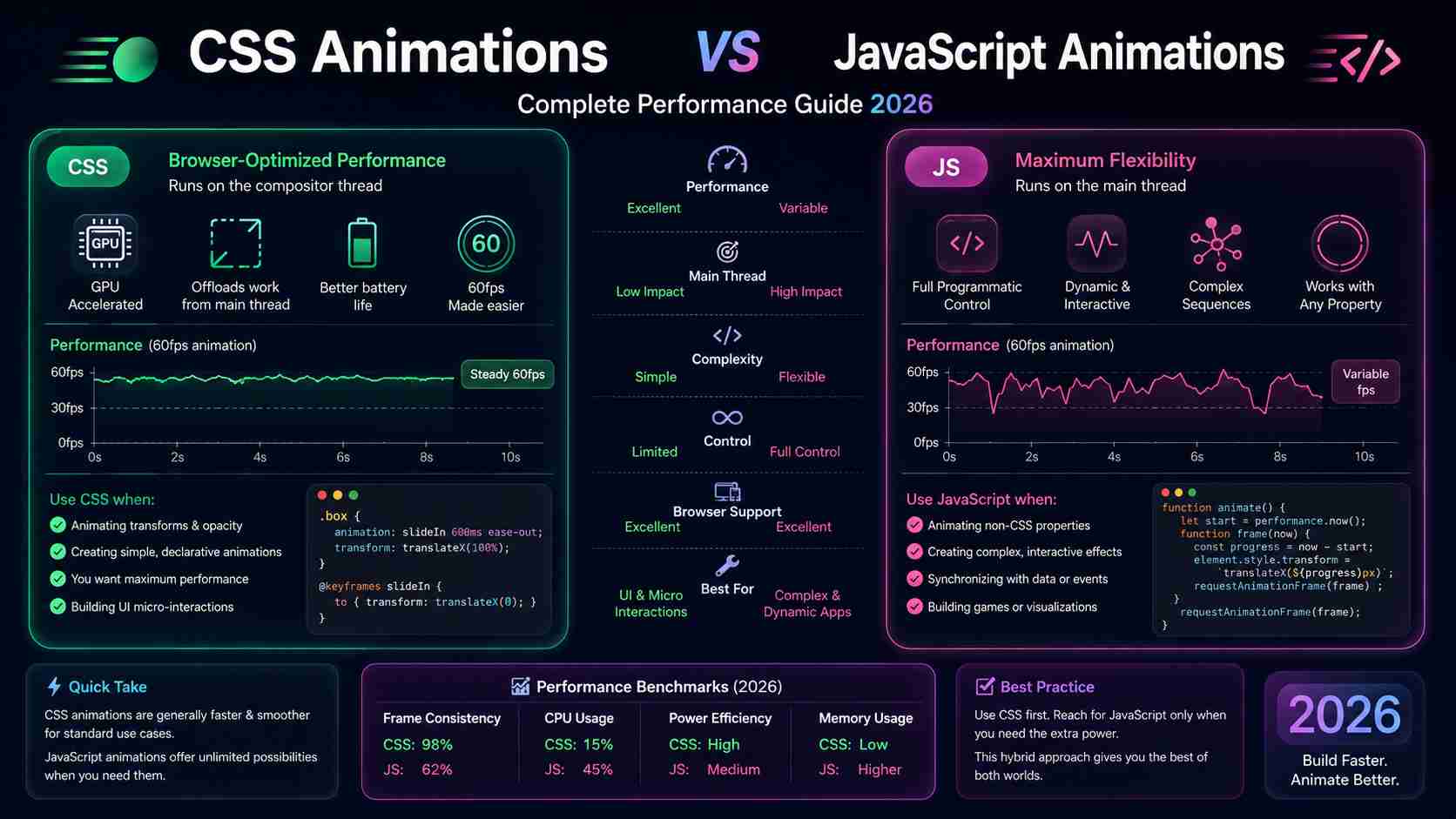
If you’ve ever built a mobile web app or an Android WebView project, you’ve probably hit this question at some point — should I use CSS animations or JavaScript animations? And honestly, it’s one of those things that sounds simple until you actually dig into it.
Both approaches animate elements on screen. But how they do it, and how fast they do it, is very different. In 2026, with devices ranging from budget Android phones to high-end flagships, choosing the right method still matters a lot.
Let me walk you through this properly — from the basics to the practical stuff.
What Are CSS Animations vs JavaScript Animations, Really?
Before picking sides, it helps to understand what each one actually does under the hood.
CSS Animations are handled by the browser’s rendering engine. You write keyframes in your stylesheet, set a duration, and the browser handles the rest — often handing the work off to the GPU (graphics processing unit) automatically.
JavaScript Animations give you programmatic control. You write logic in JS that updates element styles or positions — usually via requestAnimationFrame, the Web Animations API, or libraries like GSAP.
Neither is universally better. That’s the honest answer. But context changes everything.
How the Browser Renders Animations (This Part Matters)
To understand performance, you need a quick mental model of how browsers draw things.
Every time something changes visually, the browser goes through a process: style calculation → layout → paint → composite. The goal with any animation is to skip as many of those steps as possible and land directly at the “composite” stage — because that’s where the GPU takes over.
Properties like transform and opacity skip layout and paint entirely. They go straight to compositing. That’s why animating transform: translateX() is smooth, but animating margin-left or width causes the browser to redo layout — which is expensive.
This matters equally for both CSS Animations vs JavaScript Animations. The property you animate matters more than the method, in many cases.
CSS Animations: Where They Shine
CSS animations are genuinely elegant for a lot of common UI work. Here’s what they’re good at.
Simple Transitions and State Changes
Button hover effects, menu fade-ins, loader spinners — CSS handles all of this cleanly. You write it once, the browser optimizes it, and you move on.
css
@keyframes fadeIn {
  from { opacity: 0; transform: translateY(10px); }
  to   { opacity: 1; transform: translateY(0); }
}

.card {
  animation: fadeIn 0.3s ease-out forwards;
}
That’s it. No event listeners. No JavaScript involved. The browser figures out the compositing path on its own — and on most Android devices, even mid-range ones, this runs at 60fps without much effort.
Performance on the Main Thread
CSS animations that use transform and opacity run on the compositor thread — completely separate from the main JavaScript thread. That means even if your JS is doing something heavy in the background, your CSS animation stays smooth.CSS Animations vs JavaScript Animations
This is a real advantage. On budget Android phones where the CPU is under pressure, this separation can make a visible difference.
Limitations You Should Know
CSS animations can’t respond to dynamic values easily. If you want an animation to depend on a user’s scroll position, or change direction based on a data fetch result — CSS alone won’t cut it. You’d need JavaScript to apply class changes or update custom properties.
Also, sequencing complex multi-step animations in CSS gets messy fast. The syntax isn’t designed for that.
JavaScript Animations: Where They Win
JavaScript animations give you control that CSS simply can’t match in certain situations.
Dynamic, Data-Driven Motion
Imagine you’re building an Android finance app using a WebView. You want a chart bar to grow to a height that comes from an API call. CSS can’t know that value until runtime.
JavaScript can calculate it, apply it, and animate it — all in the same function. This kind of flexibility is where JS-based approaches genuinely pull ahead.
The requestAnimationFrame Approach
Using requestAnimationFrame (rAF) is the right way to do JS animations manually. It syncs your updates to the browser’s repaint cycle — so you’re not wasting frames or causing unnecessary repaints.
javascript CSS Animations vs JavaScript Animations
function animateBox(timestamp) {
  element.style.transform = `translateX(${progress}px)`;
  if (progress < 300) {
    progress += 2;
    requestAnimationFrame(animateBox);
  }
}
requestAnimationFrame(animateBox);
Done right, this is smooth. Done wrong — updating left or top instead of transform, for example — it gets janky fast.
Libraries Like GSAP
GSAP (GreenSock Animation Platform) has been around for years and it’s still the gold standard for complex JS animation in 2026. It handles sequencing, easing curves, timeline control, and scroll-triggered effects in ways that are genuinely hard to replicate in pure CSS.
For most Android WebView projects where you need cinematic onboarding screens or interactive tutorials, GSAP is worth its weight.
Head-to-Head: CSS Animations vs JavaScript Animations in 2026
Let’s make this direct and practical.
| Scenario | Better Choice |
|---|---|
| Button hover / focus state | CSS |
| Page transition / route change | CSS or Web Animations API |
| Scroll-driven animation | JavaScript |
| Data-reactive motion | JavaScript |
| Looping background effects | CSS |
| Complex sequenced timelines | JavaScript (GSAP) |
| Performance-critical on low-end Android | CSS (compositor thread) |
This table is a guide, not gospel. Real projects blend both.
The Web Animations API: The Middle Ground
Something worth knowing about in 2026 — the Web Animations API (WAAPI) is now well-supported across Android browsers. It lets you write animations in JavaScript with CSS-level performance.
javascript [CSS Animations vs JavaScript Animations]
element.animate([
  { opacity: 0, transform: 'translateY(20px)' },
  { opacity: 1, transform: 'translateY(0)' }
], {
  duration: 400,
  easing: 'ease-out',
  fill: 'forwards'
});
This runs on the compositor thread (for safe properties), gives you JavaScript control, and works natively without any library. For teams working on Android WebView apps in 2026, this is genuinely underused.
You can read more about it at MDN’s Web Animations API documentation — it’s thorough and regularly updated.
Common Mistakes Developers Make
Animating the Wrong Properties
Regardless of whether you pick CSS or JS, animating width, height, top, left, or margin triggers layout recalculation. Stick to transform and opacity for smooth results.
This is the single most impactful fix I’ve seen in real Android projects. An app that felt sluggish became noticeably smoother just by switching from animating height to animating transform: scaleY().
Overloading the Main Thread
If you’re running heavy JS logic and trying to animate simultaneously, expect jank. Offload what you can to web workers, or use CSS animations so the compositor thread handles visuals independently.
Skipping will-change
For elements you know will animate, adding will-change: transform gives the browser a heads-up to promote that element to its own layer. Don’t overuse it — it consumes memory — but for complex components, it helps.CSS Animations vs JavaScript Animations
Testing Animation Performance on Android
Chrome DevTools is your best friend here. Open the Performance tab, record a session, and look at the flame chart. You want to see smooth 60fps frames with no long tasks blocking the main thread.
For real Android device testing, Chrome’s remote debugging over USB lets you profile directly on a physical phone. Emulators don’t always reflect real performance accurately — especially on lower-end devices.
The Google Web Fundamentals guide on rendering performance is still one of the most accurate references you’ll find in 2026.
Which Should You Default To in 2026?
Honestly? Start with CSS. It’s simpler, it’s fast, and for 70% of UI animation needs, it does everything you need without pulling in a library or writing complex JS.
When CSS hits its limits — dynamic values, complex sequences, scroll-based triggers — bring in JavaScript or the Web Animations API.
The developers who build the smoothest Android web experiences aren’t religious about one approach. They know both well enough to pick correctly.
Final Conclusion
The CSS Animations vs JavaScript Animations debate doesn’t have a winner — it has a right tool for each job. CSS animations handle everyday UI work efficiently, keep animations off the main thread, and require less code. JavaScript animations handle complexity, dynamic data, and advanced sequencing that CSS simply can’t express.
In 2026, with the Web Animations API maturing and devices spanning a wide performance range, knowing both is more valuable than committing to either. For Android developers working on WebView interfaces, the practical approach is CSS-first with JavaScript where needed — not the other way around.
Animate smart properties. Test on real devices. And don’t over-engineer what a few keyframes can handle.