Mukesh1@gmail.com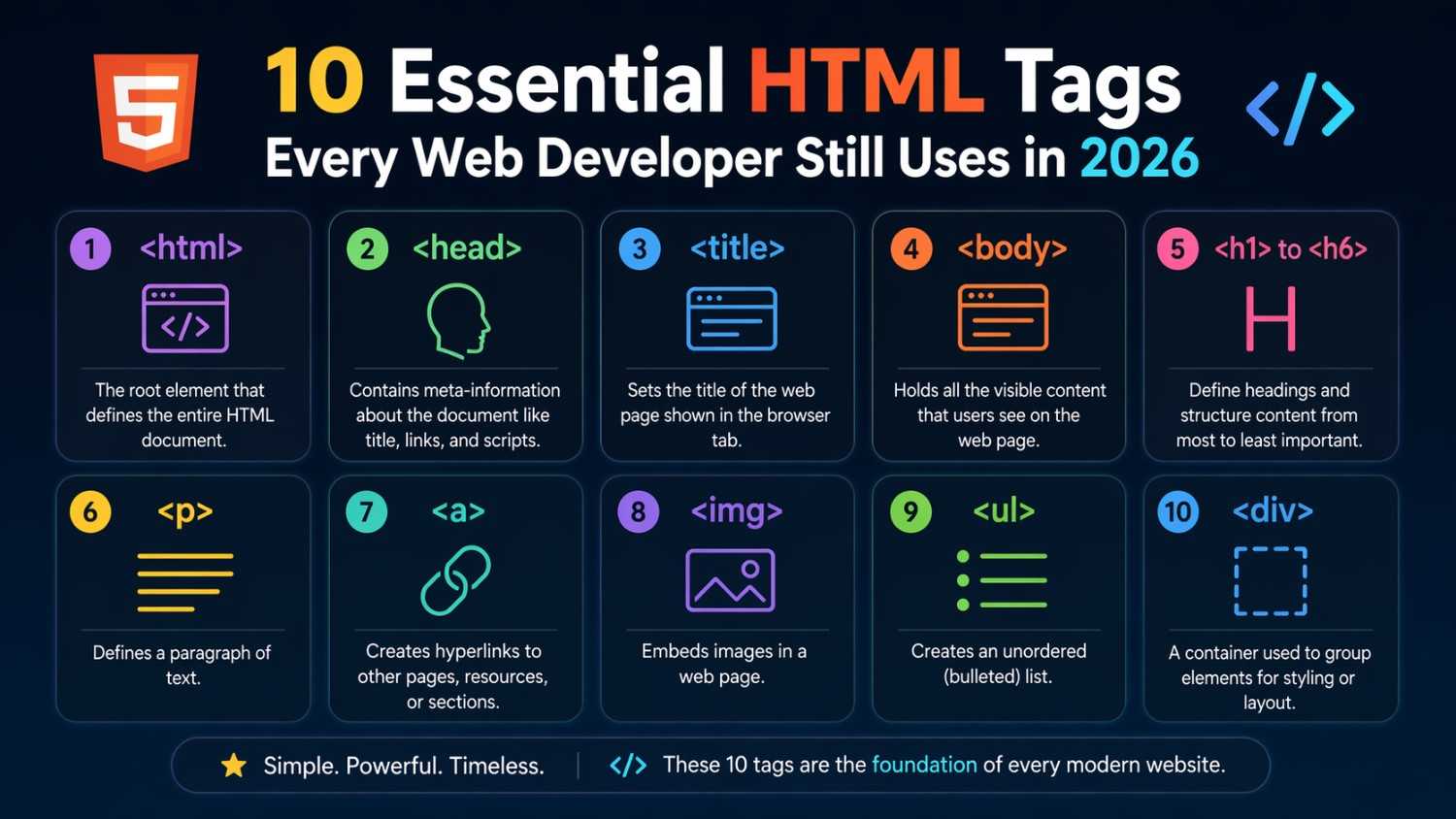
These 10 Essential HTML Tags
If you’re just beginning your journey into building websites or brushing up your skills, let’s start with 10 Essential HTML Tags Every Web Developer Still Uses in 2026. These tags are the building blocks of every web page, no matter how modern or advanced the design. You’ll see why they are indispensable and how they apply to real situations when you open your Android phone browser to view a site.
HTML hasn’t changed at its core for decades, so understanding these tags gives you confidence and clarity. In this guide, I explain each tag in a straightforward way.
Before we explore each tag, it’s worth talking about why the same basic HTML tags remain vital even in 2026. When you visit a simple blog or a complex interactive platform on your phone, the browser still parses HTML to show content. Knowing these tags makes it easier to debug layout problems or understand frameworks. Each tag plays a role in structure, meaning, or accessibility — the foundation of user‑friendly websites.
1. <html> -The Root of Every Webpage
The first of the 10 Essential HTML Tags Every Web Developer Still Uses in 2026 is <html>. This tag wraps the entire page content.
Think of it as the shell of your website. When you save a file as index.html and open it on your Android browser, everything you see is inside this tag.
Simple example:
<!DOCTYPE html>
<html>
  <!-- Everything else goes here -->
</html>
This tag doesn’t look fancy, but it’s always present — it tells the browser that you’re writing HTML.
2. <head> – Information About the Page
Next up in the list of 10 Essential HTML Tags Every Web Developer Still Uses in 2026 is <head>. This part doesn’t show on the screen but carries metadata.
It includes the title you see in your browser tab, links to stylesheets, or references to scripts. For example:
<head>
  <title>My Website</title>
</head>
On an Android phone, this title appears as the browser tab name, helping users know where they are.
3. <title> – The Page Title
Nested inside <head>, the <title> tag is one of the 10 Essential HTML Tags Every Web Developer Still Uses in 2026. It defines the title shown in search results and in browser tabs.
A useful rule: keep it concise and descriptive. Bad titles make pages hard to find when searching.
4. <body> -Visible Content Container
This is where things get visible. Of the 10 Essential HTML Tags Every Web Developer Still Uses in 2026, <body> contains all text, images, buttons, and interactive elements that a user sees.
Example:
<body>
  <h1>Welcome to My Site</h1>
  <p>Hello! This is my first post.</p>
</body>
Everything here affects what people see on the screen.
5. <h1> to <h6> – Headings That Structure Your Content
Headings are vital for readability. Among the 10 Essential HTML Tags Every Web Developer Still Uses in 2026, these tags define sections and hierarchy.
<h1>represents the main heading.<h2>to<h6>divide subsections.
On a phone, these headings adjust size and make content easier to scan. A good practice is using one <h1> per page for clarity and SEO.
6. <p> – Paragraphs of Text
Text content lives in <p> tags. This is a core part of the 10 Essential HTML Tags Every Web Developer Still Uses in 2026.
A paragraph might look like:
<p>I learned HTML by building pages on my old Android tablet.</p>
Browsers automatically create spacing around <p> tags, which makes text easier to read.
7. <a> – Links That Connect Pages
The <a> tag is one of those 10 Essential HTML Tags Every Web Developer Still Uses in 2026 that turns words into clickable links.
Example:
<a href="https://developer.mozilla.org/">Visit MDN Web Docs</a>
This link takes you to the MDN Web Docs — a great official reference for web developers (external link). When testing HTML on your phone, tapping links is how navigation works.
8. <img> – Images on the Web
Websites need visuals. The <img> tag, part of the 10 Essential HTML Tags Every Web Developer Still Uses in 2026, inserts images.
Example:
<img src="logo.png" alt="Website Logo">
Always add alt text for accessibility. If an image doesn’t load, the alt text tells the user what should appear.
9. <div> – Flexible Containers
The <div> tag is a basic page container in the group of 10 Essential HTML Tags Every Web Developer Still Uses in 2026. It helps group sections of the page.
Developers often use <div> with CSS to style parts of a page.
<div class="sidebar">
  <!-- sidebar content -->
</div>
On Android phones, this structure helps responsive styles adjust content positions.
10. <form> – User Input Interface
Last on our list of 10 Essential HTML Tags Every Web Developer Still Uses in 2026 is <form>. It collects user data like search queries or signup information.
Example:
<form action="/submit">
  <input type="text" name="name">
  <button type="submit">Send</button>
</form>
Forms work with server scripts to send user input for processing.
How These Tags Work Together
All 10 Essential HTML Tags Every Web Developer Still Uses in 2026 create a web page experience. When you type a URL in your Android browser, your phone requests HTML. The browser reads tags like <html>, <head>, and <body> and renders the visible parts.
For instance, without <body>, nothing would show on the screen. Without <a> links, you couldn’t navigate between pages. These tags aren’t flashy, but they are dependable building blocks.
Real‑World Example: Building a Simple Page
Here’s a small project that puts everything together:
<!DOCTYPE html>
<html>
<head>
  <title>My First Site</title>
</head>
<body>
  <h1>About Me</h1>
  <p>I am learning HTML on my phone.</p>
  <a href="contact.html">Contact Me</a>
  <img src="profile.jpg" alt="Profile Picture">
</body>
</html>
This page uses nine of the 10 Essential HTML Tags Every Web Developer Still Uses in 2026 and shows how they fit into a real scenario. You could add a <form> next to let visitors send feedback.
Why Beginners Must Master These Tags
Understanding these tags means you can confidently build static pages and understand how modern frameworks generate HTML under the hood. JavaScript libraries and backend tools still produce HTML that browsers parse.
If your tag structure is wrong, pages may display strangely on phones. For instance, forgetting to use headings can make content confusing. The tags help both humans and machines make sense of the page.
Beyond the Basics: What Comes Next
Once you’re comfortable with the 10 Essential HTML Tags Every Web Developer Still Uses in 2026, you can learn:
- CSS for styling (
<link>to connect stylesheets) - JavaScript for interactivity
- Semantic tags like
<article>and<section>for better structure
You’ll find many tutorials on these topics. A highly useful external resource is the official HTML documentation at https://developer.mozilla.org/en-US/docs/Web/HTML (external link). For deeper learning exercises, https://w3schools.com/html/ offers interactive examples as well.
Common Mistakes Beginners Make
One frequent mistake is misnesting tags. For example:
<p><h1>Title inside paragraph?</h1></p>
That shouldn’t happen. Keep headings separate from paragraphs.
Another issue is missing alt text on images — which hurts accessibility.
Learning these small details improves your websites instantly.
Testing Your HTML on an Android Device
You don’t need a desktop to learn HTML. There are apps that let you write and preview HTML files directly on your Android phone. You can save a file named index.html and open it in your mobile browser. Seeing how your code renders helps you understand the role of each tag from the 10 Essential HTML Tags Every Web Developer Still Uses in 2026.
Many web developers started by editing files on a simple text editor and refreshing the browser — a practice that still works today.
Final Conclusion
Understanding the 10 Essential HTML Tags Every Web Developer Still Uses in 2026 gives you a strong base to build web pages. These tags define the page structure, content, links, images, and user interaction elements. Whether you’re viewing a site on a laptop or an Android phone, modern browsers rely on these same core HTML tags. Mastering them early saves time and frustration later when you explore CSS and JavaScript. Keep experimenting and building — every great site starts with solid HTML.