Mukesh1@gmail.com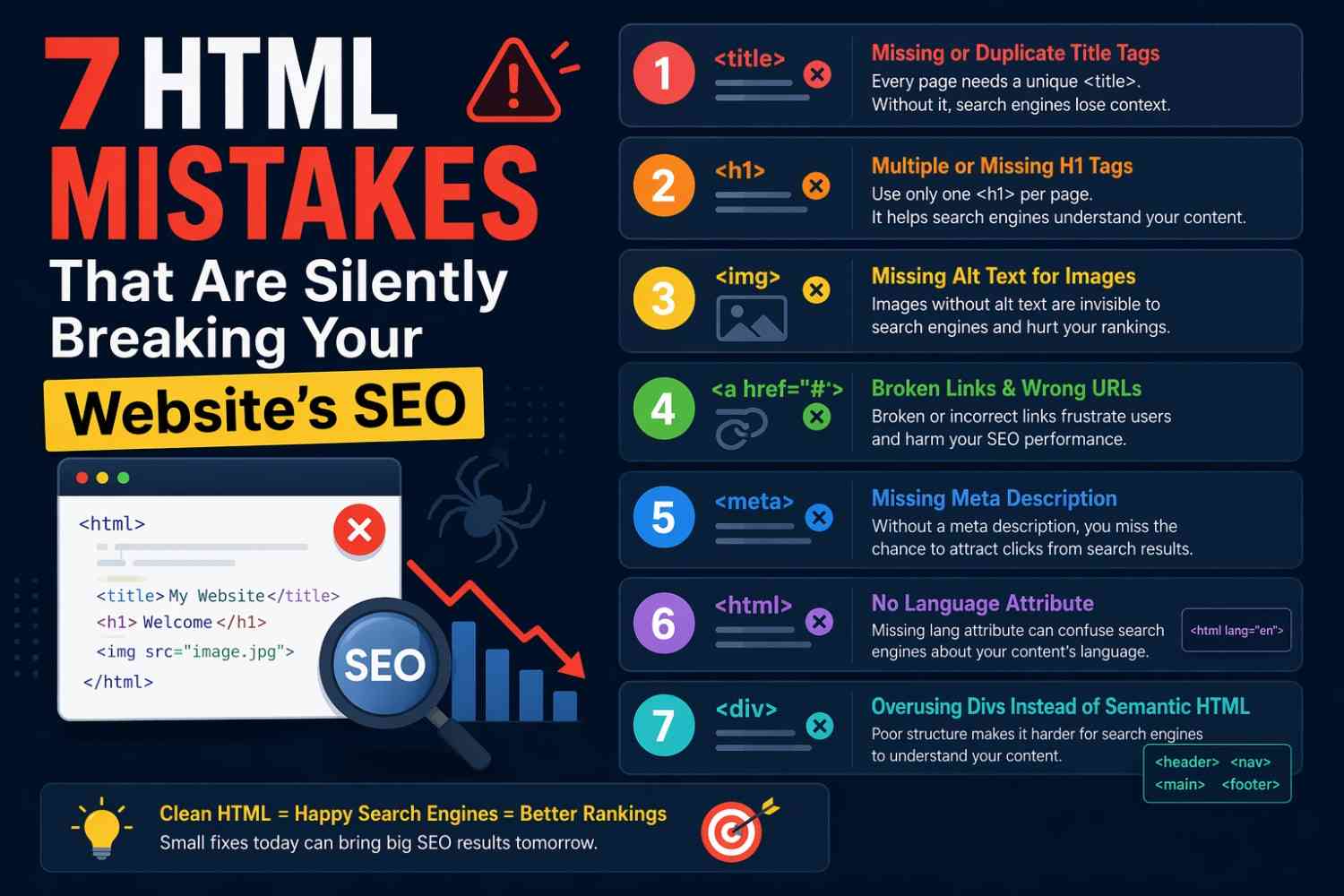
Most people assume SEO is all about keywords and backlinks. And yes, those things matter. But there’s a quieter layer underneath all of that — your actual HTML code. And if it’s messy, incomplete, or structured wrong, it can quietly drag your rankings down without giving you a single obvious clue.
These HTML mistakes breaking SEO are more common than you’d think. They show up in beginner projects, in agency-built websites, even in templates that thousands of people download and use without a second glance.
This guide walks through seven of the most damaging ones — not in a vague, theoretical way, but with real examples you can actually check on your own site today.
Why HTML Structure Has a Direct Impact on SEO
Before the list, a quick grounding point.
Search engine crawlers don’t see your website the way a human visitor does. They read your HTML. They follow your tags. They try to understand what your page is about based on how the code is written and structured.
When your HTML is clean and semantically meaningful, crawlers can do their job well. When it’s broken or confusing, they make guesses — and those guesses often don’t favor your content.
These HTML mistakes breaking SEO aren’t dramatic crashes. They’re slow leaks. The kind that compound over time and quietly cost you rankings you didn’t even know you were losing.
Mistake 1: Using Multiple H1 Tags on a Single Page
This one is probably the most widespread mistake on the list.
The H1 tag is supposed to signal the main topic of your page — the single most important heading. When a page has two, three, or five H1 tags, search engines have to guess which one actually represents the page’s core topic. They don’t always guess right.
What This Looks Like in Practice
Some website builders and themes automatically wrap the site name in an H1. Then the blog post title also gets an H1. Now every page has at least two, and crawlers are confused from the start.
Fix it by making sure each page has exactly one H1 — the main title of that specific page. Subheadings should follow the proper hierarchy: H2 for major sections, H3 for subsections beneath those.
This single fix is one of the easiest ways to address HTML mistakes breaking SEO without touching a single line of content.
Mistake 2: Missing or Poorly Written Title Tags
The <title> tag is what shows up in browser tabs and, more importantly, in Google search results as the clickable headline.
Leaving it empty, using the same title tag on multiple pages, or stuffing it with keywords — all of these hurt you. A missing title tag means Google writes one for you, and it usually picks something generic or off-topic.
What a Bad Title Tag Looks Like
html
<title>Home | My Website</title>That tells Google almost nothing about what the page offers a visitor. It’s one of the most common HTML mistakes breaking SEO for small business websites especially.
A better version for a bakery’s homepage might be:
html
<title>Fresh Sourdough & Custom Cakes in Pune | Sunrise Bakery</title>Keep title tags under 60 characters, make them unique for every page, and include your primary keyword naturally near the front.
Mistake 3: Skipping Meta Descriptions Entirely
Meta descriptions don’t directly affect your ranking position. But they affect whether someone actually clicks your result — and click-through rate does influence how Google evaluates your page over time.
When there’s no meta description, Google pulls random text from the page. Sometimes it picks something useful. Often it grabs the footer copyright text, a cookie notice, or the first sentence of a nav menu. That’s what your potential visitors see before deciding whether to click.
How to Fix It
Every page needs a unique meta description between 50 and 160 characters. It should summarize the page, include the focus keyword naturally, and give someone a clear reason to click.
html
<meta name="description" content="Learn how to bake light, airy sourdough at home with our step-by-step beginner guide and video walkthrough.">It takes five minutes per page and is one of the simplest HTML mistakes breaking SEO to fix immediately.
Mistake 4: Images Without Alt Text
This mistake has two victims: search engines and visually impaired users.
Search engine crawlers cannot see images. They read the alt attribute to understand what an image depicts. If alt text is missing, that image is invisible to them — it contributes nothing to your page’s content signals.
For users relying on screen readers, missing alt text means they get zero information about what the image shows. It’s both an SEO and an accessibility failure at the same time.
Common Patterns That Go Wrong
alt=""(empty on a meaningful image)alt="image123.jpg"(the filename used as alt text)alt="photo photo photo sourdough sourdough bread"(keyword stuffing)
The right approach is descriptive but concise:
html
<img src="sourdough-loaf.jpg" alt="Golden sourdough loaf cooling on a wire rack">If it’s a decorative image that adds no information, an empty alt is actually correct. But for content images, describe what’s there honestly.
Neglecting image alt text is one of those HTML mistakes breaking SEO that also affects your ranking in Google Image Search — a traffic source many site owners completely forget about.
Mistake 5: Broken or Missing Canonical Tags
Duplicate content is a real problem for SEO. And it often happens without any intention — just from how URLs work.
Consider these URLs:
https://example.com/blog/post-onehttps://example.com/blog/post-one?ref=newsletterhttp://example.com/blog/post-onehttps://www.example.com/blog/post-one
To a human, those all look like the same page. To a search engine, they can be four separate pages with identical content — which triggers duplicate content penalties or splits ranking signals across versions.
The Canonical Tag Fix
A canonical tag tells crawlers which version of a URL is the “real” one you want indexed.
html
<link rel="canonical" href="https://example.com/blog/post-one">
```

Placing this in the `<head>` of every page — pointing to the preferred version — consolidates your authority and avoids confusion. Missing or incorrect canonical tags are **HTML mistakes breaking SEO** that affect even well-written, high-quality content.

---

## Mistake 6: Poor Heading Hierarchy That Confuses Crawlers

This is different from the multiple H1 issue. This is about the overall heading structure jumping around randomly.

Some pages go from H1 straight to H4. Others use H2 tags as visual styling choices, not for actual structure. Some themes use heading tags for sidebars and widgets that have nothing to do with the article content.

Crawlers use heading hierarchy to build an outline of your page. If that outline is scrambled, they can't accurately understand what's primary information, what's secondary, and what's supplementary.

### A Healthy Heading Structure Looks Like This
```
H1 — Main Page Title
  H2 — Major Section
    H3 — Subsection
    H3 — Subsection
  H2 — Major Section
    H3 — Subsection
Don’t skip levels. Don’t use heading tags just because they make text look bigger. Use CSS for visual styling, and reserve heading tags for actual content structure.
Cleaning up heading hierarchy is one of the underestimated HTML mistakes breaking SEO — it doesn’t look broken on the surface, which is exactly why it gets ignored.
Mistake 7: Render-Blocking Scripts in the <head> Without Proper Attributes
This one leans slightly more technical, but the concept is straightforward.
When a browser loads your page, it reads the HTML from top to bottom. If it hits a <script> tag in the <head> without proper handling, it stops — waits for that script to download and execute — then continues. This delays when your page content actually becomes visible to the user.
Google uses page speed and Core Web Vitals as ranking factors. Pages that are slow to load — even if the content is excellent — take a rankings hit.
The Fix: defer and async Attributes
html
<!-- Blocking — bad -->
<script src="analytics.js"></script>

<!-- Non-blocking — good -->
<script src="analytics.js" defer></script>
The defer attribute tells the browser to download the script in the background and run it after the HTML is fully parsed. The async attribute is similar but runs the script as soon as it’s downloaded, without waiting for parsing to finish.
Most third-party scripts — analytics, chat widgets, ad code — should use defer unless there’s a specific reason not to. This is one of those HTML mistakes breaking SEO that directly ties HTML decisions to measurable performance scores you can track in Google Search Console and PageSpeed Insights.
You can audit your current pages using Google’s PageSpeed Insights and verify your heading and metadata structure through Screaming Frog SEO Spider, both of which are free to use for basic audits.
For more foundational reading, check out our guide on semantic HTML elements and when to use them and our walkthrough of how to audit your website’s technical SEO from scratch.
Final Conclusion
The seven HTML mistakes breaking SEO covered here don’t announce themselves loudly. That’s what makes them dangerous. A page can look perfectly fine in a browser while quietly underperforming in search — and the gap between what you see and what crawlers see is almost always rooted in code.
Going through your pages and fixing multiple H1 tags, incomplete title tags, missing alt text, broken canonicals, scrambled heading hierarchy, absent meta descriptions, and render-blocking scripts won’t produce overnight results. But it will build a stronger technical foundation — one that allows your actual content quality to show up properly in search results.
Most of these fixes take less than an hour per page. That’s a reasonable investment for something that compounds quietly in your favor for months and years ahead.