Mukesh1@gmail.com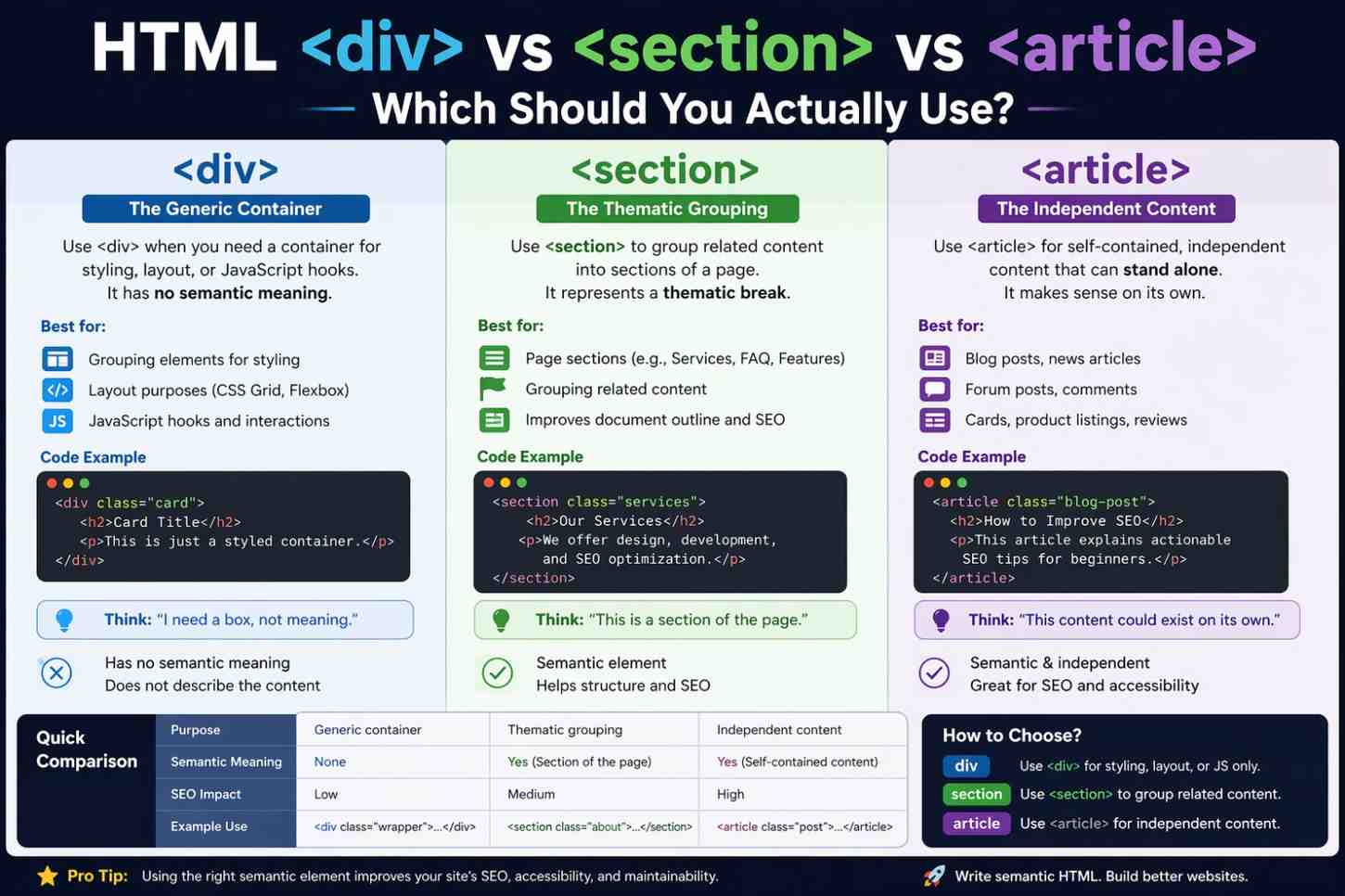
If you’ve spent any time writing HTML, you’ve probably stared at your screen wondering — should this be a <div>, a <section>, or an <article>? It’s one of those things that looks simple but trips up beginners and even some experienced developers. Understanding HTML div vs section vs article properly makes your code cleaner, more readable, and better for both browsers and search engines.
Let’s walk through this the right way — no jargon overload, just practical understanding.
Why Semantic HTML Actually Matters in 2026
Before diving into the tags themselves, it’s worth understanding why this even matters.
HTML has evolved. The old way was to wrap everything in <div> tags and call it a day. But modern HTML5 introduced semantic elements — tags that describe the meaning of content, not just its appearance.
Search engines like Google read your HTML. Screen readers for visually impaired users read your HTML. Other developers on your team read your HTML. When your structure is meaningful, all of them benefit.
Using the right tag in the right place is part of writing professional, accessible code.
The <div> Tag: The General-Purpose Container
Let’s start with the one everyone knows — <div>.
The <div> element has no semantic meaning whatsoever. It’s a generic container. Think of it like a plain cardboard box — useful for holding things, but it doesn’t tell you what’s inside.
When Should You Use <div>?
Use <div> when you need to group elements purely for styling or layout purposes — and when no other semantic element fits.
For example, if you’re building a card layout and you need a wrapper just to apply a CSS class for flexbox or grid, <div> is the right call. There’s no deeper meaning there; it’s just a layout tool.
html
<div class="card-grid">
  <div class="card">...</div>
  <div class="card">...</div>
</div>
In the context of HTML div vs section vs article, <div> is neutral. It says nothing to the browser or search engine about what the content represents. That’s fine when you genuinely just need a wrapper.
Overusing <div> everywhere — what developers call “div soup” — is the problem. It makes your code hard to read and loses the SEO and accessibility benefits that semantic elements provide.
The <section> Tag: A Thematic Grouping
Now here’s where things get a bit more interesting.
The <section> element represents a thematic grouping of content. It’s for content that belongs together under one theme or topic — and it typically comes with a heading.
When Should You Use <section>?
If your page has multiple distinct parts — like an “About Us” chunk, a “Services” chunk, and a “Testimonials” chunk — each of those is a candidate for a <section>.
The key rule: a <section> should almost always have an <h2> or similar heading inside it. If there’s no heading, you’re probably looking at a <div> situation instead.
html
<section>
  <h2>Our Services</h2>
  <p>We offer web design, development, and SEO consulting.</p>
</section>
In the broader discussion of HTML div vs section vs article, think of <section> as a chapter in a book. It belongs to the whole document, but it has its own identity and topic.
What <section> Is NOT
<section> is not a replacement for <div>. Some beginners make the mistake of using <section> everywhere just because it sounds more “official.” But if the content doesn’t have a clear theme or heading, stick with <div>.
The <article> Tag: Self-Contained, Standalone Content
This one has the most specific purpose — and once you get it, it clicks.
The <article> element is for content that is self-contained and could stand alone independently from the rest of the page. If you could take that block of content, paste it into another website or RSS feed, and it would still make complete sense — it’s an <article>.
Real-Life Examples of <article>
- A blog post
- A news story
- A product review
- A user comment on a forum
- A social media post embedded on a page
html
<article>
  <h2>5 Tips for Better Sleep</h2>
  <p>Published on April 2, 2025 by Dr. Mehta</p>
  <p>Getting quality sleep is one of the most overlooked health habits...</p>
</article>
That content makes sense on its own. Strip it from the page, share it in an email newsletter, post it on Medium — it still works. That’s the test for <article>.
When thinking through HTML div vs section vs article, <article> is your most semantically powerful choice. It signals strong meaning: “this content stands on its own.”
Can You Nest These Elements?
Yes, and this is where it gets genuinely useful.
You can nest <article> inside <section>, and you can nest <section> inside <article>. It depends on your content structure.
Example: Nesting <article> Inside <section>
Imagine a blog page. The page has a “Latest Posts” section. Inside that section, each blog post preview is its own article.
html
<section>
  <h2>Latest Posts</h2>
  <article>
    <h3>How to Learn HTML in 30 Days</h3>
    <p>Starting with the basics is always the best move...</p>
  </article>
  <article>
    <h3>CSS Grid vs Flexbox: A Practical Comparison</h3>
    <p>Both are powerful layout tools, but they shine in different situations...</p>
  </article>
</section>
That structure is clean, readable, and semantically accurate.
Example: Nesting <section> Inside <article>
Now flip it. Say you have one long article with multiple sections inside it — an intro, a methodology section, a results section. Each part is a <section> inside the parent <article>.
html
<article>
  <h1>Understanding Sleep Science</h1>
  <section>
    <h2>The Basics of Sleep Cycles</h2>
    <p>...</p>
  </section>
  <section>
    <h2>What Disrupts Deep Sleep</h2>
    <p>...</p>
  </section>
</article>
This is totally valid and actually recommended for long-form content.
A Quick Decision Checklist
When you’re stuck — which happens to everyone — ask yourself these questions:
Is this purely for layout or styling with no semantic value? → Use <div>
Does this content form a themed group with a heading, but wouldn’t make sense outside the page? → Use <section>
Could this content be removed from the page and shared elsewhere independently? → Use <article>
That mental checklist handles about 90% of real-world cases. The remaining 10% comes with practice.
How This Affects SEO and Accessibility
This is the practical payoff of understanding HTML div vs section vs article properly.
Search engine crawlers use HTML structure to understand content hierarchy. A page built with semantic elements gives clearer signals about what’s important. Your main article content is more likely to be read as primary content — not just random text inside nested divs.
For accessibility, screen readers announce semantic roles to users. An <article> element tells a screen reader “this is a standalone piece of content.” A <section> signals a new thematic chunk. A <div> says nothing. That difference matters for real users who depend on assistive technology.
You can learn more about semantic HTML best practices at MDN Web Docs and read the official HTML specification details at HTML Living Standard by WHATWG.
For more foundational reading, explore our guide on HTML5 structural elements explained for beginners and our breakdown of how to write accessible HTML forms.
Common Mistakes Beginners Make
A few patterns come up again and again when people are learning this:
Using <section> as a fancy <div> — If there’s no heading and no clear theme, it’s probably a <div>.
Using <article> for everything — Not every piece of content is self-contained. A sidebar widget is not an article.
Ignoring semantics entirely — Building pages with only <div> tags works visually, but it creates technical debt and accessibility problems down the road.
Forgetting headings inside <section> — A section without a heading is almost always a sign you’ve chosen the wrong element.
Final Conclusion
The debate around HTML div vs section vs article really comes down to one core idea: use the element that most accurately describes what your content is, not just how you want it to look.
<div> handles layout with no meaning. <section> organizes themed content with a heading. <article> wraps self-contained content that can live anywhere. Get those three rules down and your HTML structure will be noticeably better.HTML div vs section vs article
It takes a little practice before these choices feel natural. But once they do, reading and writing HTML becomes faster, and your pages become more meaningful to both humans and machines.