Mukesh1@gmail.com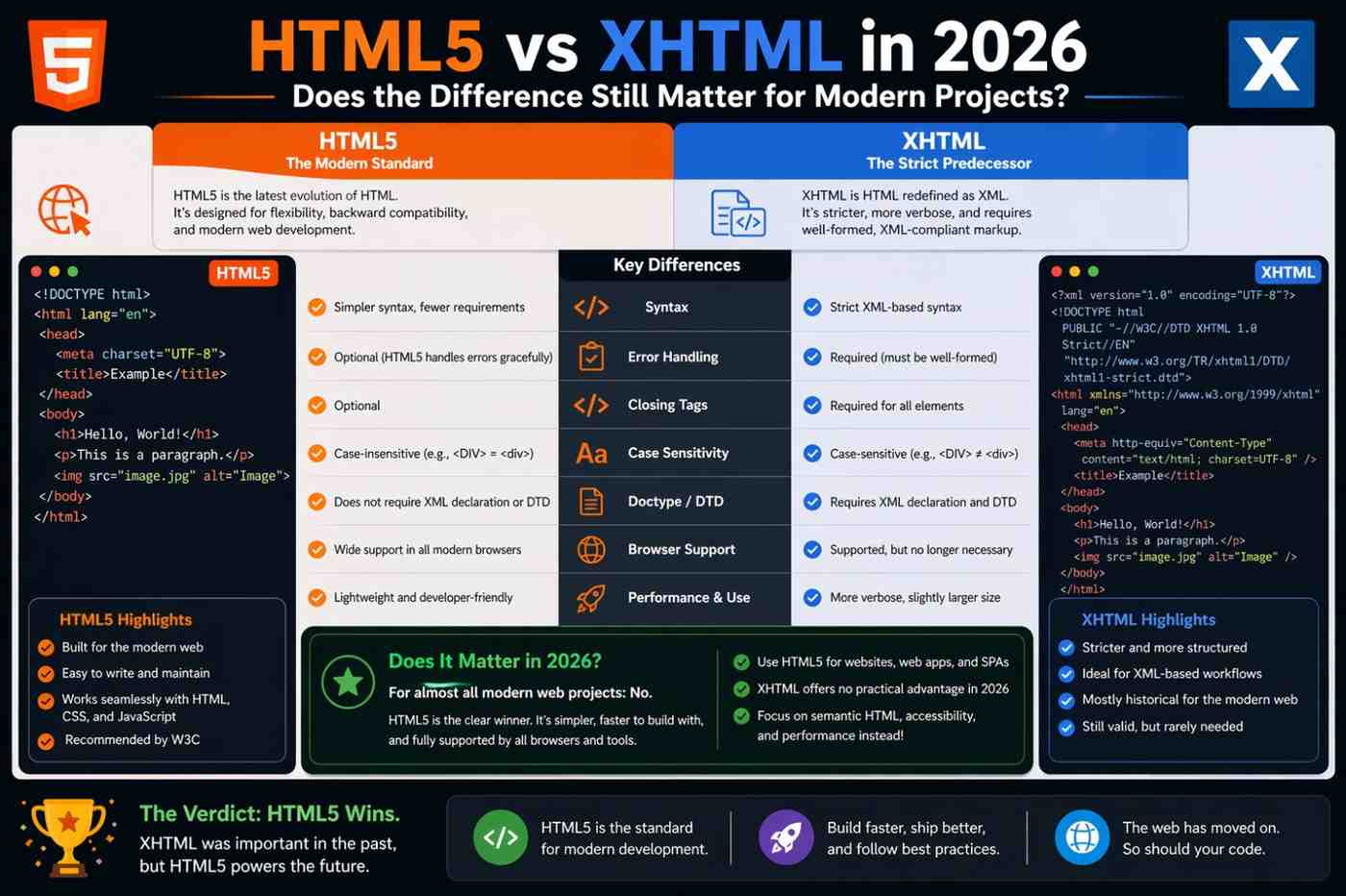
If you’ve spent any time reading about web development history, you’ve probably come across both terms. HTML5 vs XHTML gets debated in older forums, mentioned in beginner courses, and occasionally brought up in job interviews. But for someone building websites in 2026, the real question is practical: does this difference actually affect your work, or is it just technical trivia?
The honest answer is somewhere in the middle. The distinction matters less than it did fifteen years ago, but understanding it properly still has real value — especially when you’re reading legacy codebases, working with XML-based systems, or trying to understand why certain HTML practices exist in the first place.
This article explains the HTML5 vs XHTML difference clearly, covers what each one actually is, and gives you an honest picture of where things stand for modern web projects in 2026.
Where This All Started – A Quick Background
To understand HTML5 vs XHTML, it helps to know where XHTML came from and why it existed.
In the late 1990s and early 2000s, the W3C — the organization that maintains web standards — was concerned that HTML had become too loose and inconsistent. Browsers were extremely forgiving of badly written markup. Missing closing tags, improperly nested elements, uppercase tag names mixed with lowercase — browsers would render it all anyway, filling in the gaps silently.
The W3C decided that the web needed a stricter foundation. Their solution was XHTML — Extensible HyperText Markup Language — which applied the strict syntax rules of XML to HTML. Every tag had to be closed. Attribute values had to be quoted. Tag names had to be lowercase. Documents had to be well-formed, or they would fail entirely rather than render with silent errors.
The idea made sense in theory. In practice, browser adoption was inconsistent, the strictness created real friction for developers, and a parallel effort to develop HTML5 eventually won out as the direction the web actually moved.
What XHTML Actually Requires
XHTML isn’t just “stricter HTML.” It has specific technical requirements that distinguish it meaningfully from standard HTML.
Every element must be properly closed. In standard HTML, a <p> tag doesn’t strictly require a closing </p> — the browser infers it. In XHTML, every opened element must be explicitly closed. Self-closing elements like <br> must be written as <br />.
Attribute values must always be quoted. Writing <input type=text> is acceptable in HTML. In XHTML, it must be <input type="text"> — quotes are mandatory.
Tag and attribute names must be lowercase. Writing <DIV> or <IMG SRC=""> violates XHTML rules. Everything must be lowercase.
Documents must have a valid DOCTYPE and namespace declaration. An XHTML document begins with a specific DOCTYPE and includes an xmlns attribute on the root <html> element declaring the XML namespace.
A single syntax error can break the entire document. This is the biggest practical difference in the HTML5 vs XHTML comparison. When a browser receives a document served as genuine XML, a well-formedness error causes a parse error — the page may fail to render entirely rather than display with the error silently corrected.
What HTML5 Does Differently
HTML5 took the opposite philosophical approach to XHTML. Rather than enforcing strictness at the parser level, HTML5 standardized the error-handling behavior that browsers had already been practicing informally for years.
Browsers had always been forgiving of bad markup because real-world HTML was messy and breaking pages would have been catastrophic for the web. HTML5 acknowledged that reality and codified it — defining precisely how browsers should handle malformed markup rather than pretending all markup would be perfect.
This is a subtle but important point in the HTML5 vs XHTML discussion. HTML5 didn’t lower standards for writing good HTML. It standardized how browsers recover from bad HTML. The expectation is still that developers write clean, correct markup — but a missing closing tag won’t crash a page.
HTML5 also brought genuinely new capabilities that XHTML never had: native video and audio elements, the canvas API, local storage, semantic structural elements like <article>, <section>, <nav>, and <aside>, and significantly improved form input types.
For a practical reference on all HTML5 elements and their current browser support, MDN Web Docs on HTML is the most accurate and up-to-date resource available.
The Doctype Difference – Small Detail, Real Meaning
One of the clearest visible differences in HTML5 vs XHTML is the DOCTYPE declaration at the top of a document.
An HTML5 document starts with:
html
<!DOCTYPE html>Simple, short, and easy to remember. This tells the browser to use modern HTML5 parsing rules.
An XHTML 1.0 Strict document starts with something like:
html
<!DOCTYPE html PUBLIC "-//W3C//DTD XHTML 1.0 Strict//EN"
"http://www.w3.org/TR/xhtml1/DTD/xhtml1-strict.dtd">
That’s followed by an <html> tag with an xmlns attribute. The verbosity alone tells you something about the different eras these standards come from.
If you open a legacy project and see that long DOCTYPE string at the top, you’re looking at XHTML. If you see <!DOCTYPE html>, you’re looking at HTML5 — which covers almost every modern project you’ll encounter.
Does XHTML Still Get Used in 2026?
This is where the HTML5 vs XHTML question becomes very practical.
For standard website and web application development, XHTML is essentially unused in new projects. HTML5 is the universal standard. Every major framework, CMS, static site generator, and front-end toolchain outputs HTML5 by default. There is no realistic scenario where a new project in 2026 would choose XHTML over HTML5 for a standard web context.
Where XHTML — or more precisely, XML-based markup — still appears is in specific technical contexts:
SVG files use XML syntax. When SVG is embedded inline in an HTML document, it follows its own namespace and syntax rules that have XHTML-like characteristics.
RSS and Atom feeds are XML documents that share structural similarities with XHTML. Feed readers and aggregators consume this format regularly.
Epub ebooks use XHTML as their document format. If you work in digital publishing, XHTML is still very much present.
Enterprise XML systems sometimes produce or consume XHTML as part of data pipelines, content management workflows, or document processing systems.
So the answer isn’t that XHTML disappeared entirely. It narrowed into specific niches where XML processing is genuinely required. For general web development, it’s not part of the picture.
The Writing Habits That Came From XHTML – Still Worth Keeping
Here’s something the HTML5 vs XHTML debate often misses: many of the strict writing practices XHTML enforced are still good habits in HTML5 — even though HTML5 doesn’t strictly require them.
Closing all your tags explicitly. Quoting all attribute values. Writing tag names in lowercase. Keeping your markup well-nested and logically structured. These practices don’t hurt in HTML5 — they make your code more readable, more consistent, and easier to maintain.
Many style guides and linting tools for HTML still enforce XHTML-style habits for exactly this reason. The strictness XHTML tried to mandate at the parser level, good developers apply voluntarily through discipline and tooling.
If you’ve ever wondered why experienced developers write <br /> with the self-closing slash even in HTML5 documents where it’s technically unnecessary — that habit came directly from years of writing XHTML. It’s harmless in HTML5 and carries over naturally.
How Browsers Handle the Two Formats Today
This is a technical detail worth understanding clearly in the HTML5 vs XHTML comparison.
When a browser receives an HTML document, it uses the HTML parser — which is forgiving and applies HTML5 error-recovery rules. When a browser receives a document with an XML MIME type (application/xhtml+xml), it uses the XML parser — which is strict and will display a parse error for any well-formedness violation.
Most XHTML documents served on the web today are actually served with the text/html MIME type, which means browsers parse them using the HTML parser anyway. The XML strictness is effectively not enforced at the browser level in those cases.
This is one reason the practical impact of HTML5 vs XHTML diminished so significantly. Even when developers wrote XHTML syntax, browsers were often not enforcing XHTML rules during parsing. The distinction became more about coding discipline than technical behavior.
What a Beginner Should Actually Take Away From This
If you’re new to web development, here’s the practical summary of what the HTML5 vs XHTML distinction means for your work right now.
Write HTML5. Every modern project uses it. Every learning resource, course, and tutorial targets it. There is no reason to learn XHTML for general web development in 2026.
Adopt clean writing habits regardless. Close your tags. Quote your attributes. Use lowercase consistently. These habits make your HTML better — not because a parser will reject it otherwise, but because clean code is easier to read, debug, and maintain.
Understand XHTML exists when you encounter it. If you open a legacy project or read older tutorials and see XHTML syntax and DOCTYPE declarations, you’ll recognize what you’re looking at and understand why it’s written that way.
Know that XML-based formats still exist in specific contexts. SVG, RSS, and epub use XML-derived syntax. Understanding XHTML gives you a useful frame of reference when you encounter these formats.
For deeper reading on how modern browsers parse HTML versus XML, the WHATWG HTML Living Standard is the authoritative technical reference — though it’s detailed reading aimed at developers who want the full picture.
The Bigger Picture – Standards Evolution and What It Means
The story of HTML5 vs XHTML is really a story about how web standards evolve in response to reality rather than ideals.
XHTML was technically elegant. A web built entirely on well-formed XML would have been cleaner and more consistent in some theoretical sense. But the web wasn’t built in a controlled environment — it was built by millions of developers with varying skill levels, using tools of varying quality, under deadline pressure, over decades.
HTML5 succeeded because it worked with that reality rather than against it. It standardized what browsers were already doing, added meaningful new capabilities, and gave developers a practical path forward without demanding that the entire existing web be rewritten.
That pragmatism is worth remembering whenever you see new debates about web standards and best practices. The technologies that last are usually the ones that meet developers where they are — not the ones that demand perfection as a prerequisite.
Final Conclusion
The HTML5 vs XHTML question doesn’t have a complicated answer for modern web development: HTML5 is what you use, and XHTML is what you understand for context. New projects in 2026 are built on HTML5 without exception in standard web contexts. XHTML survives in specific niches — digital publishing, XML data systems, feed formats — where its technical characteristics serve a genuine purpose.
What the comparison teaches, beyond the technical details, is that good writing habits matter regardless of which standard you’re using. Clean, well-structured, semantically correct HTML is worth writing whether the parser enforces it or not. That discipline is what separates markup that holds up over time from markup that creates problems the moment someone else has to work with it.
Learn HTML5 thoroughly. Write it carefully. And when you encounter XHTML in the wild — in a legacy codebase, an epub file, or an RSS feed — you’ll have enough context to understand what you’re looking at and why it was written that way.