Mukesh1@gmail.com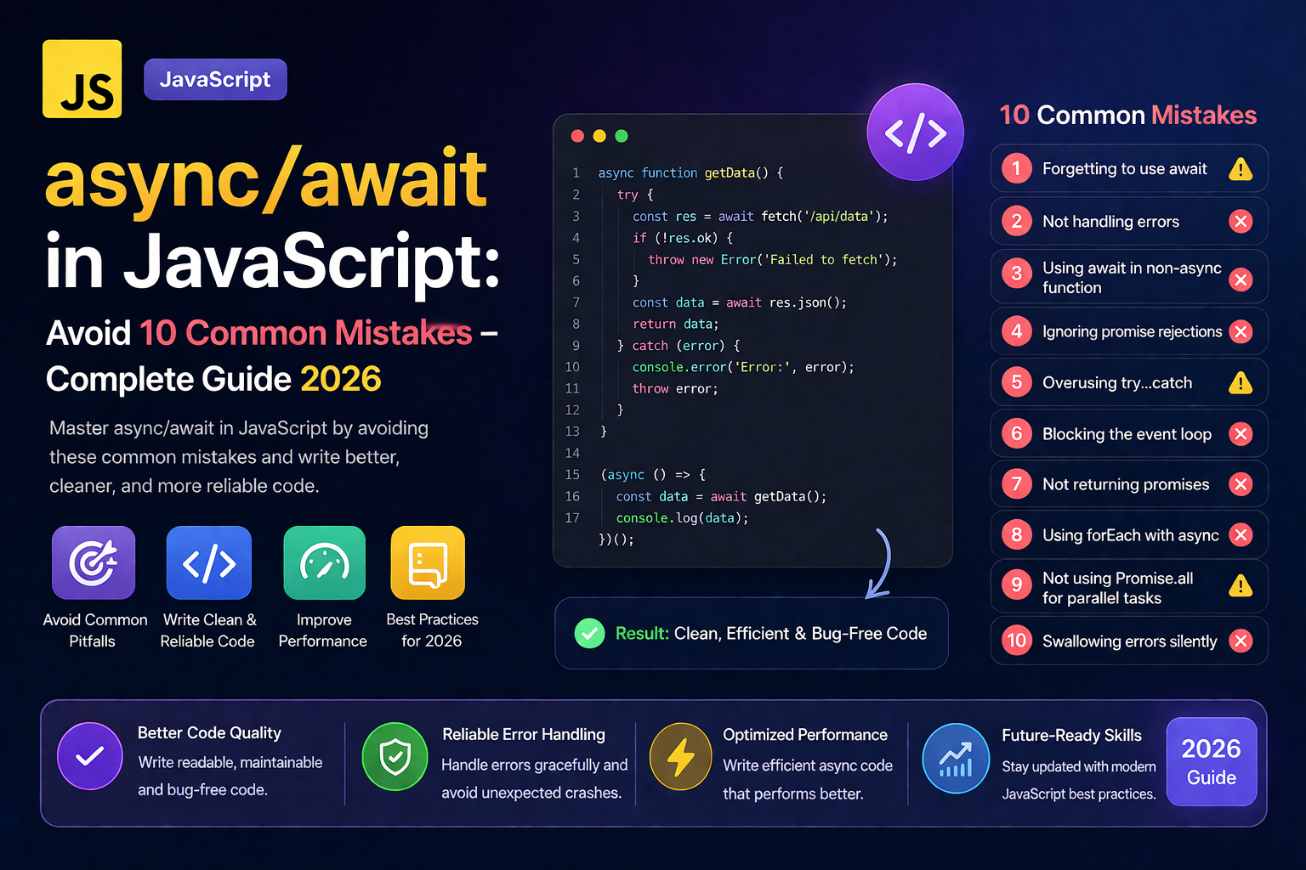
Introduction
If you have been writing JavaScript for a while, you know that dealing with asynchronous code used to be… messy. Callback functions, then .then() chains — they worked, but reading that code a week later felt like decoding a puzzle.
That is exactly why async/await in JavaScript became such a game changer when it arrived. It lets you write asynchronous code that looks like normal, sequential code. Cleaner, easier to follow, and far less indented.
But here is the thing — a lot of developers, especially beginners, pick up the syntax quickly and then run straight into problems. Silent errors, unhandled promise rejections, code that freezes up without any explanation.
This guide is going to walk you through how async/await in JavaScript actually works, show you real-world usage patterns, and — most importantly — help you avoid the mistakes that trip up even experienced developers. By the end, you will have a solid, practical understanding you can start using right away.
What Is async/await in JavaScript, Really?
Before we talk about mistakes, let us make sure the foundation is solid.
async/await in JavaScript is not some entirely new feature — it is built on top of Promises. When you mark a function as async, it automatically returns a Promise. The await keyword pauses execution inside that function until the Promise resolves.
async function greetUser() {
  return "Hello!";
}

greetUser().then(msg => console.log(msg));
// "Hello!"
Even though we just returned a plain string, greetUser() returned a Promise. That is the async keyword at work.
The await part is where it gets interesting:
async function fetchData() {
  const response = await fetch("https://api.example.com/data");
  const data = await response.json();
  console.log(data);
}
Each await line waits for the operation to finish before moving to the next line. No callbacks. No .then() nesting. Just clean, readable code.
Why Developers Love async/await in JavaScript
The older way of handling async operations with Promises was already a big improvement over callbacks. But chaining .then() after .then() could get verbose fast.
// Promise chain — gets unwieldy quickly
fetch("/api/user")
  .then(res => res.json())
  .then(user => fetch(`/api/orders/${user.id}`))
  .then(res => res.json())
  .then(orders => console.log(orders))
  .catch(err => console.error(err));
With async/await in JavaScript, the same logic becomes:
async function getUserOrders() {
  const userRes = await fetch("/api/user");
  const user = await userRes.json();
  const orderRes = await fetch(`/api/orders/${user.id}`);
  const orders = await orderRes.json();
  console.log(orders);
}
Same result. Dramatically easier to read. That is the real reason async/await in JavaScript took over modern codebases so quickly.
Common Mistake #1 – Forgetting try/catch for Error Handling
This is probably the single most common problem people run into with async/await in JavaScript. When something goes wrong — a failed network request, a server error, anything — and there is no try/catch, the error gets swallowed silently or causes an unhandled rejection.
// Dangerous — no error handling
async function loadUser() {
  const res = await fetch("/api/user");
  const data = await res.json();
  return data;
}
If the API is down, this function fails quietly. Your app might just freeze or show nothing. Here is the correct way:
async function loadUser() {
  try {
    const res = await fetch("/api/user");
    const data = await res.json();
    return data;
  } catch (error) {
    console.error("Failed to load user:", error);
    return null;
  }
}
Wrapping your await calls in try/catch is not optional — it is just how async/await in JavaScript is meant to be used safely.
Common Mistake #2 – Using await Inside a Regular Function
This one causes a syntax error that beginners sometimes find confusing. The await keyword only works inside an async function. Use it anywhere else and JavaScript will throw immediately.
// Wrong — await outside async function
function loadData() {
  const data = await fetch("/api/data"); // SyntaxError!
  return data;
}
The fix is simple — just add async:
async function loadData() {
  const data = await fetch("/api/data");
  return data;
}
A related version of this mistake happens with array methods like .forEach(). People sometimes try to use await inside a forEach callback thinking it will work, but it does not behave the way you expect.
// Does NOT await properly
const ids = [1, 2, 3];
ids.forEach(async (id) => {
  const data = await fetchById(id);
  console.log(data);
});
The forEach does not wait for each async callback to finish. Use a regular for...of loop instead when you need proper awaiting in async/await in JavaScript:
for (const id of ids) {
  const data = await fetchById(id);
  console.log(data);
}
Common Mistake #3 – Awaiting Things That Do Not Need to Be Awaited
Not everything needs an await. Putting await on synchronous values or functions that do not return Promises wastes nothing technically — JavaScript just wraps it — but it is misleading code and can slow things down if misapplied.
// Pointless await on a sync value
async function getName() {
  const name = await "John"; // just... return "John"
  return name;
}
More importantly, people sometimes await two independent async operations sequentially when they could run in parallel:
// Sequential — slower
async function loadDashboard() {
  const user = await fetchUser();
  const stats = await fetchStats(); // waits for user before even starting
  return { user, stats };
}
If fetchUser and fetchStats are completely independent, this is unnecessarily slow. Use Promise.all() instead:
// Parallel — faster
async function loadDashboard() {
  const [user, stats] = await Promise.all([fetchUser(), fetchStats()]);
  return { user, stats };
}
This is one of the most impactful optimizations you can make when working with async/await in JavaScript.
Common Mistake #4 – Not Handling HTTP Error Status Codes
A lot of beginners assume that if a fetch() call resolves (does not throw), everything went fine. That is not true.
fetch() only rejects (throws) on network-level failures like no internet connection. If the server returns a 404 or 500, the Promise still resolves — just with a response that has ok: false.
async function getPost(id) {
  try {
    const res = await fetch(`/api/posts/${id}`);
    if (!res.ok) {
      throw new Error(`Server error: ${res.status}`);
    }
    const post = await res.json();
    return post;
  } catch (err) {
    console.error(err);
  }
}
Always check res.ok when using fetch() with async/await in JavaScript. It saves a lot of debugging time.
Common Mistake #5 – Ignoring the Return Value of Async Functions
Since async functions always return a Promise, you cannot just call them like a regular function and use the result directly.
async function getTotal() {
  return 42;
}

const result = getTotal();
console.log(result); // Promise { 42 } — NOT 42
You need to either await it or use .then():
const result = await getTotal(); // 42
This trips up a lot of people when they start mixing async/await in JavaScript with regular function calls in their codebase.
Common Mistake #6 – async/await in Event Listeners Without Proper Error Handling
Using async in an event listener is totally fine — but the error handling matters more there because the browser will not always show you what went wrong.
// Risky
button.addEventListener("click", async () => {
  const data = await fetchSomething();
  updateUI(data);
});
If fetchSomething() rejects, nothing happens visibly. Always wrap it:
button.addEventListener("click", async () => {
  try {
    const data = await fetchSomething();
    updateUI(data);
  } catch (err) {
    showErrorMessage("Something went wrong. Try again.");
    console.error(err);
  }
});
Small addition, big difference in user experience.
Practical Pattern – Using async/await in JavaScript With Real APIs
Let us put it all together in a realistic scenario. Say you are building a simple weather widget that fetches data from an API.
async function getWeather(city) {
  try {
    const response = await fetch(
      `https://api.weatherapi.com/v1/current.json?key=YOUR_KEY&q=${city}`
    );

    if (!response.ok) {
      throw new Error(`Could not fetch weather. Status: ${response.status}`);
    }

    const weather = await response.json();
    return {
      city: weather.location.name,
      temp: weather.current.temp_c,
      condition: weather.current.condition.text
    };
  } catch (error) {
    console.error("Weather fetch failed:", error.message);
    return null;
  }
}

// Calling it
const result = await getWeather("Mumbai");
if (result) {
  console.log(`${result.city}: ${result.temp}°C, ${result.condition}`);
}
This is a clean, production-ready pattern using async/await in JavaScript — proper error handling, status check, structured return value, and a null-safe caller.
async/await in JavaScript With Promise.allSettled()
Sometimes you want to run multiple requests and handle each result independently — even if some fail. Promise.allSettled() is perfect for this and pairs naturally with async/await in JavaScript.
async function loadMultiple() {
  const results = await Promise.allSettled([
    fetch("/api/products"),
    fetch("/api/reviews"),
    fetch("/api/related")
  ]);

  results.forEach((result, index) => {
    if (result.status === "fulfilled") {
      console.log(`Request ${index} succeeded`);
    } else {
      console.warn(`Request ${index} failed:`, result.reason);
    }
  });
}
Unlike Promise.all(), which short-circuits on the first failure, Promise.allSettled() waits for every request and gives you individual outcomes. Very useful for dashboard-style pages with multiple data sources.
H2: Debugging async/await in JavaScript – Quick Tips
When things go wrong, here are a few things to check immediately:
Are you seeing “Promise { pending }”? You probably forgot to await the function call, or you are logging inside a non-async context.
Is your function returning undefined? Check that your return statement is inside the try block, not missing entirely.
Are errors being silently swallowed? Add a .catch() at the end of your async function call as a safety net even if you have try/catch inside:
loadUser().catch(err => console.error("Unhandled:", err));
Modern browsers also show unhandled promise rejections in the console — watch for UnhandledPromiseRejectionWarning in Node.js environments.
Good debugging habits are inseparable from good async/await in JavaScript usage.
Learning Resources for async/await in JavaScript
For an authoritative reference, the MDN documentation on async functions covers every edge case with detailed explanations — bookmark it.
For a more guided, interactive learning path, javascript.info’s guide on async/await is one of the clearest walkthroughs available and includes exercises that reinforce each concept.
Final Conclusion
async/await in JavaScript transformed the way developers write asynchronous code — and for good reason. It made what used to be deeply nested, hard-to-follow chains into something that reads like a step-by-step story. But clean syntax does not automatically mean bug-free code.
The mistakes we covered here — skipping try/catch, misusing await inside non-async contexts, awaiting sequential operations that could run in parallel, and missing HTTP error checks — are all completely avoidable once you know to look for them.
The goal is not just to use async and await because they look modern. The goal is to write code that handles real-world conditions gracefully — network failures, slow responses, partial data. That is when you know you have genuinely mastered async/await in JavaScript.
Start applying these patterns in your next project. Replace one promise chain. Add a try/catch you have been skipping. Try Promise.all() somewhere it makes sense. The improvement in your code quality will be immediately noticeable.