Mukesh1@gmail.com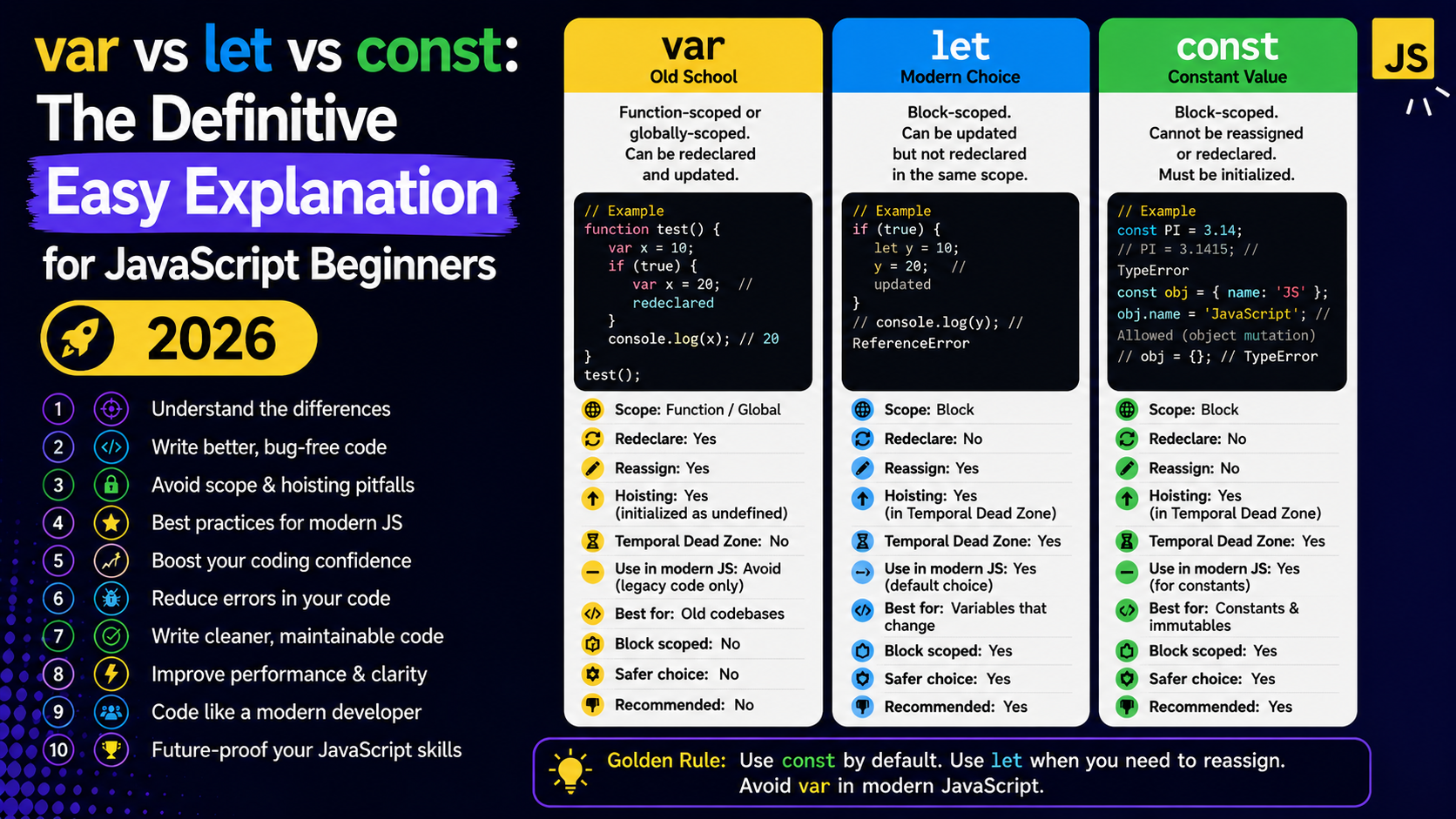
Introduction
If you’ve just started learning JavaScript, chances are you’ve already seen three different ways to create a variable — var, let, and const. And you’ve probably wondered: why are there three? Which one should I use? Are they the same?
The honest answer is: no, they’re not the same — and the differences matter more than you’d think. Using the wrong one at the wrong time can cause bugs that are genuinely hard to track down, especially when your code grows bigger.
Understanding var vs let vs const is one of those foundational JavaScript concepts that every developer needs to get right early. It’s not optional knowledge — it shapes how your entire program behaves. The good news is that once it clicks, it really clicks. And this guide is written specifically to make it click.
We’ll walk through each keyword, compare them side by side, look at real examples, and by the end you’ll know exactly which one to reach for in any situation. No jargon, no unnecessary complexity — just clear, honest explanation.
What Is a Variable in JavaScript?
Before diving into var vs let vs const, it helps to understand what a variable actually is in JavaScript.
A variable is simply a named container that holds a value. Think of it like a labeled box — you put something inside, give it a name, and then refer to that name whenever you need that value later.
let age = 25;
console.log(age); // Output: 25
In this example, age is the variable, and 25 is the value stored inside it. Simple enough. Now the question is — which keyword do you use to create that box? That’s where var vs let vs const becomes important.
A Brief History – Why Does JavaScript Have Three Keywords?
JavaScript was created in 1995, and var was the only way to declare variables back then. It worked, but it had some quirky behaviors that caused a lot of confusion and bugs.
When ECMAScript 2015 (also called ES6) was released, JavaScript introduced let and const as better, more predictable alternatives. They fixed most of the problems that var caused.
So today in 2026, var still exists for backward compatibility — meaning older code won’t break — but most modern JavaScript developers avoid it in new code. Understanding var vs let vs const means understanding both the old way and the better, newer way.
Understanding var – The Old Way
Let’s start with var because it’s the original, and understanding its quirks makes everything else easier to appreciate.
var name = "Rahul";
console.log(name); // Output: Rahul
Simple enough. But var has two behaviors that cause problems: function scope and hoisting.
var Is Function-Scoped
Scope means: where in your code can a variable be accessed? With var, the scope is the entire function it’s declared in — not the specific block.
function greet() {
  if (true) {
    var message = "Hello!";
  }
  console.log(message); // Output: Hello!
}
greet();
Even though message was declared inside the if block, it’s accessible outside of it — within the same function. This might seem convenient, but it leads to accidental bugs where variables bleed into parts of code they shouldn’t reach.
var Is Hoisted (And That’s Weird)
Hoisting is a JavaScript behavior where variable declarations are moved to the top of their scope automatically — before the code runs.
console.log(city); // Output: undefined (not an error!)
var city = "Mumbai";
JavaScript doesn’t throw an error here. Instead, it silently reads the declaration of city early but doesn’t assign the value until that line actually runs. This is called hoisting, and it’s a major source of confusing bugs with var.
var Can Be Redeclared
With var, you can declare the same variable name twice in the same scope without any error:
var score = 10;
var score = 99; // No error — just overwrites silently
console.log(score); // Output: 99
This seems harmless in a tiny example, but in a large file with thousands of lines, accidentally redeclaring a variable is a serious problem. You might overwrite important data without realizing it.
These three issues — function scope, hoisting, and silent redeclaration — are exactly why let and const were introduced. The var vs let vs const debate really starts here.
Understanding let – The Modern, Safer Choice
let was introduced in ES6 to fix the problems of var. It’s the go-to keyword for variables whose values will change over time.
let score = 0;
score = 10; // Reassigning is fine
console.log(score); // Output: 10
let Is Block-Scoped
Unlike var, let is scoped to the block it’s declared in — meaning any code wrapped in curly braces {}.
function checkAge() {
  if (true) {
    let status = "adult";
    console.log(status); // Output: adult
  }
  console.log(status); // Error: status is not defined
}
checkAge();
The variable status only exists inside the if block. Outside of it, it’s gone. This is predictable, clean behavior — exactly what you want.
let Is Not Hoisted (In a Usable Way)
Technically, let is also hoisted — but it’s placed in what developers call a Temporal Dead Zone (TDZ). Practically, this means you’ll get a proper error if you try to use it before declaration:
console.log(points); // Error: Cannot access 'points' before initialization
let points = 50;
This is actually better than var‘s silent undefined. An error tells you immediately that something is wrong, instead of hiding the problem.
let Cannot Be Redeclared in the Same Scope
let username = "Priya";
let username = "Anjali"; // Error: Identifier 'username' has already been declared
JavaScript now protects you from accidentally overwriting your own variable names. This is a real safety improvement when comparing var vs let vs const in practical coding situations.
Understanding const – For Values That Don’t Change
const stands for “constant.” Use it when you know a value should not change after it’s been set.
const PI = 3.14159;
console.log(PI); // Output: 3.14159
const Cannot Be Reassigned
const country = "India";
country = "Nepal"; // Error: Assignment to constant variable
Once you assign a value to const, that’s it. Any attempt to reassign throws an error immediately. This makes your code safer — you know that country will always be “India” throughout that scope.
const Must Be Initialized at Declaration
With let, you can declare a variable and assign it later:
let total;
total = 500; // This is fine
But with const, you must give it a value right away:
const total; // Error: Missing initializer in const declaration
This makes sense — if a value can never change, it must exist from the moment it’s created.
H3: const With Objects and Arrays – A Nuance Worth Knowing
Here’s something that trips up a lot of beginners in the var vs let vs const discussion. When you use const with an object or array, the binding is constant — but the contents can still change.
const user = { name: "Arjun", age: 22 };
user.age = 23; // This works fine!
console.log(user); // Output: { name: "Arjun", age: 23 }

user = { name: "Dev" }; // Error: Assignment to constant variable
You can modify properties inside a const object — you just can’t replace the entire object with a new one. Same applies to arrays:
const colors = ["red", "blue"];
colors.push("green"); // Fine
colors = ["yellow"]; // Error
This is one of the most important nuances in var vs let vs const that even intermediate developers sometimes misunderstand.
const Is Also Block-Scoped
Just like let, const is block-scoped. It follows all the same rules as let in terms of scope and the Temporal Dead Zone — the only difference is that it cannot be reassigned after declaration.
var vs let vs const – Side-by-Side Comparison
Let’s put all three together in one clear comparison so you can see the differences at a glance.
| Feature | var | let | const |
|---|---|---|---|
| Scope | Function | Block | Block |
| Hoisting | Yes (undefined) | Yes (TDZ error) | Yes (TDZ error) |
| Redeclarable | Yes | No | No |
| Reassignable | Yes | Yes | No |
| Must initialize | No | No | Yes |
| Introduced | ES1 (1995) | ES6 (2015) | ES6 (2015) |
This table makes the var vs let vs const comparison much easier to see clearly. In almost every row, let and const are more predictable and safer than var.
Real-World Examples – When to Use Each One
Understanding theory is useful. But let’s look at actual coding situations to make var vs let vs const feel more concrete.
Use const by Default
Most modern JavaScript developers use const as their default choice. If you know a value won’t change — use const.
const API_URL = "https://api.example.com/data";
const MAX_USERS = 100;
const appName = "MyApp";
These values never need to change during the program’s run. const protects them and signals to anyone reading your code: “This is intentionally fixed.”
Use let When the Value Will Change
Counters, loops, user input fields, totals that get updated — these all need let.
let count = 0;
for (let i = 0; i < 5; i++) {
  count += i;
}
console.log(count); // Output: 10
Notice let i in the loop — i changes every iteration, so let is the correct choice here. Using var in a loop like this can cause subtle bugs, especially in asynchronous code.
Avoid var in Modern Code
There’s really no situation in 2026 where a beginner should prefer var over let or const. The only time you’ll encounter var is in older codebases or legacy tutorials.
If you’re reading old JavaScript code and see var, just know it’s the older pattern — it still works, but it’s not the recommended approach anymore.
A Common Beginner Mistake – Confusing Reassignment With Mutation
When beginners first learn var vs let vs const, they often make this mistake:
const numbers = [1, 2, 3];
numbers = [4, 5, 6]; // They expect this to work — it doesn't!
But:
const numbers = [1, 2, 3];
numbers.push(4); // This works perfectly
The confusion is understandable. Remember: const prevents you from replacing the variable’s reference. It does not freeze the contents of objects or arrays. Mutation (changing the contents) is allowed. Reassignment (pointing to a completely new value) is not.
This is probably the single most important nuance in the entire var vs let vs const conversation for beginners.
What Do Professional JavaScript Developers Use in 2026?
The modern JavaScript community has largely settled on a simple rule:
Use
constby default. Useletwhen you know the value will change. Never usevar.
This isn’t just opinion — it’s the guidance from major style guides including Airbnb’s JavaScript Style Guide and Google’s JavaScript Style Guide. Most linting tools like ESLint will even flag var usage as a warning in modern projects.
If you’re learning JavaScript today, embrace const and let from day one. You’ll write cleaner, safer code and avoid a whole category of bugs that plagued JavaScript developers for years.
For deeper reading on modern JavaScript variable declarations and best practices, Mozilla Developer Network (MDN) has excellent documentation at developer.mozilla.org.
You might also find it helpful to explore JavaScript scope in more depth — understanding scope makes var vs let vs const even clearer. A great starting resource is the JavaScript.info guide on variables, which covers these topics with interactive examples.
Quick Decision Guide – Which Keyword Should You Use?
Not sure which to pick? Run through this simple decision process:
Will this value ever change?
- No → Use
const - Yes → Use
let
Are you writing new JavaScript code in 2026?
- Yes → Never use
var - Reading old code with
var? → Just understand it, don’t copy the pattern
Are you declaring a loop counter or accumulator?
- Yes → Use
let
Are you declaring a configuration value, a fixed URL, or a mathematical constant?
- Yes → Use
const
This simple mental model covers 95% of real-world JavaScript variable declarations. The var vs let vs const question stops being confusing once you have a clear rule to follow.
Final Conclusion
The var vs let vs const question is one of the first real decisions you make as a JavaScript developer — and now you have everything you need to make the right call every time.
var is the original keyword, but its function scope, hoisting behavior, and silent redeclaration make it unreliable for modern code. let fixes all of those problems and is perfect for values that need to change. const goes further by protecting values from reassignment, making your code more readable and your intentions clearer.
The simplest rule that actually holds up in real projects: default to const, switch to let when mutation is needed, and leave var in the past where it belongs.
JavaScript in 2026 is cleaner, more expressive, and more predictable than ever — and getting var vs let vs const right from the start puts you ahead of developers who learned the hard way. Keep coding, keep experimenting with small examples, and these distinctions will become second nature faster than you think.